
X-PAD Office Fusion allows you to export Point clouds data in different formats.
-
Click File.
-
Click Create Point Cloud data file.
-
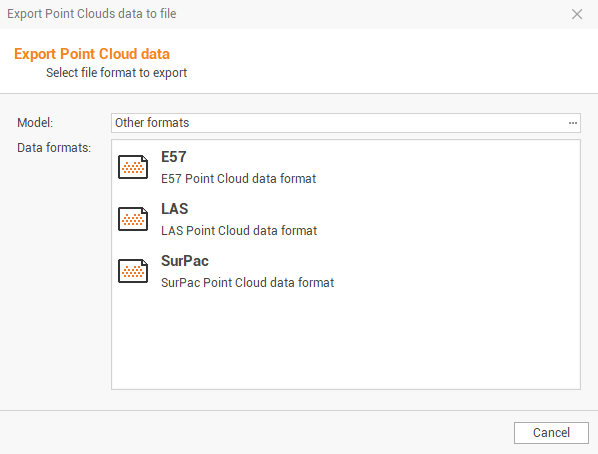
The function opens a new window.
-
Model: allows to choose the point cloud model to export from the list:
-
CYCLONE - Leica: to export Point clouds data to a Leica Cyclone format file. Selections are:
-
XYZ: exports only the coordinate information of the points in the format Pts.
-
XYZ Intensity: exports the information of the coordinates of the points and the intensity in format Pts.
-
XYZ RGB: exports the information of the coordinates of points and values of red, green, blue of the dot in format Pts.
-
XYZ Intensity RGB: exports the information of the point coordinates and the intensity and values of the red, green, blue of the dot in format Pts.
-
-
RECAP - Autodesk: to export Point clouds data to RECAP format. Selections are:
-
Autodesk RECAP single scans (RCS): exports the point clouds as RCS singel scans point cloud data format.
-
-
Text (ASCII): to export Point clouds data to a file in txt (ASCII). Selections are:
-
XYZ: exports only point coordinate information.
-
XYZ Intensity: export the information of the coordinates of the points and the intensity.
-
XYZ RGB: exports the information of the coordinates of points and values of red, green, blue of the point.
-
XYZ Intensity RGB: exports the information of the points and the intensity and the values of the red, green, blue point colors.
-
-
Other formats: to export the data from the Point clouds in the following formats: E57, LAS, SurPac. The E57e LAS formats allow you to export the intensity/reflectance parameters, the point color or the color of the layer. Selections are:
-
E57: exports point clouds to E57 data format.
-
LAS: exports point clouds to LAS data format.
-
SurPac: exports point clouds to SurPac data format.
-
-