
Tilt verification procedure
 |
|  |
| 
The software offers a tilt verification procedure useful in these cases:
The user wants to confirm the tilt measurement accuracy under current installation.
A different pole is used on the GNSS. Since the straightness of the pole is critical to tilt measurements we recommend the tilt verification procedure.
To start the procedure click on IMU icon and select Calibrate IMU.
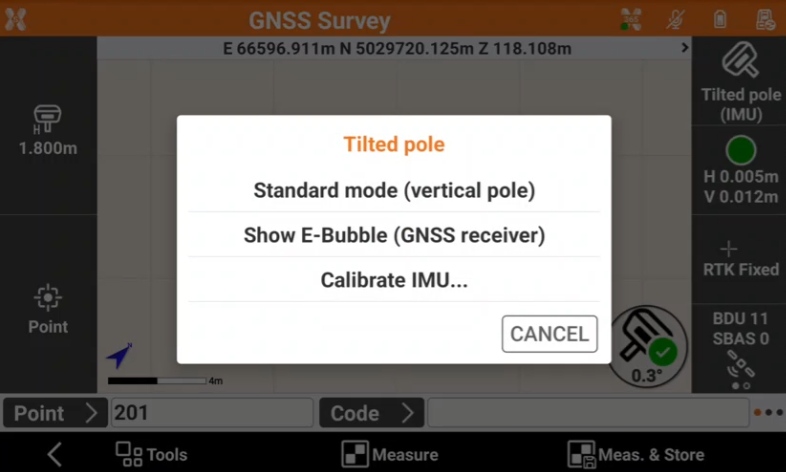
Tilt verification procedure (old GNSS firmware)

Zenith60, Zenith60 Pro: Firmware < 0.24.251210
Zenith55: Firmware < 0.24.251102
Follow the on-screen procedure:
Place the GNSS pole vertical on a point and press Start.
Swing the pole for 15 seconds back and forth and again for 15 seconds left and right.
If the verification is successful the user is informed with a Success message.

The procedure is not used to initialize the IMU.
Below video shows the procedure to perform a tilt verification procedure.
Tilt verification procedure (new GNSS firmware)
Zenith60, Zenith60 Pro: Firmware > 0.24.251210
Zenith55: Firmware > 0.24.251102
Follow the on-screen procedure:
Place the GNSS pole vertical on a point and press Start.
Swing the pole for 8 seconds back and forth.
Level the pole using the pole bubble for 8 seconds.
Rotate 90° with the GNSS receiver without moving the pole tip.
Repeat the same process following the on-screen procedure.
If the verification is successful the user is informed with a Success message.
The procedure is not used to initialize the IMU.
Below video shows the procedure to perform a tilt verification procedure from firmware 0.24.251102.