
How to upgrade instrument firmware and language

Before updating a new firmware be sure the instrument battery is fully loaded. Never disconnect the power supply during the system upload process.
Upload a new firmware
To upload a new firmware a USB pen drive is required.
It is recommended to use a formatted USB pen drive with maximum 8GB storage.
Create in the memory a new folder called SYSTEM.
Copy in the folder SYSTEM the latest instrument firmware.
Insert the memory device in the Zoom25/50.
Click Tools and select Load FW.
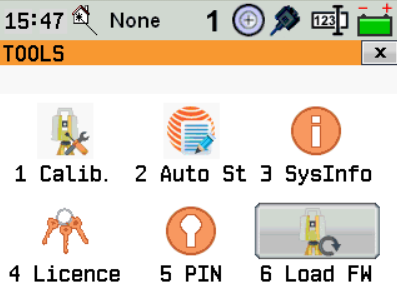
Select Firmware. The software shows the firmware files available in the SYSTEM folder in the USB. Select a file to proceed.
The firmware will be loaded and instrument automatically turn off and on. The process will take several minutes.
Upload a new language file

The language file version has to correspond to the instrument firmware version. Note that firmware may be available with ENZ or NEZ coordinate order.
To upload a new firmware a USB pen drive is required.
It is recommended to use a formatted USB pen drive with maximum 8GB storage.
Create in the memory a new folder called SYSTEM.
Copy in the folder SYSTEM the latest instrument language.
Insert the memory device in the Zoom25/50.
Click Tools and select Load FW.
Select Language. The software shows the language files available in the SYSTEM folder in the USB. Select a file to proceed.
The language will be loaded and instrument automatically turn off and on.