
Instrument setup
This topic describes an instrument setup over a marked ground point using the laser plummet. It is always possible to set up the instrument without the need for a marked ground point.

It is always recommended to shield the instrument from direct sunlight and avoid uneven temperatures around the instrument.
The laser plummet described in this topic is built into the vertical axis of the instrument. It projects a red spot onto the ground, making it appreciably easier to centre the instrument.
The laser plummet cannot be used with a tribrach equipped with an optical plummet.
Setting up the instrument
Instrument setup step-by-step:
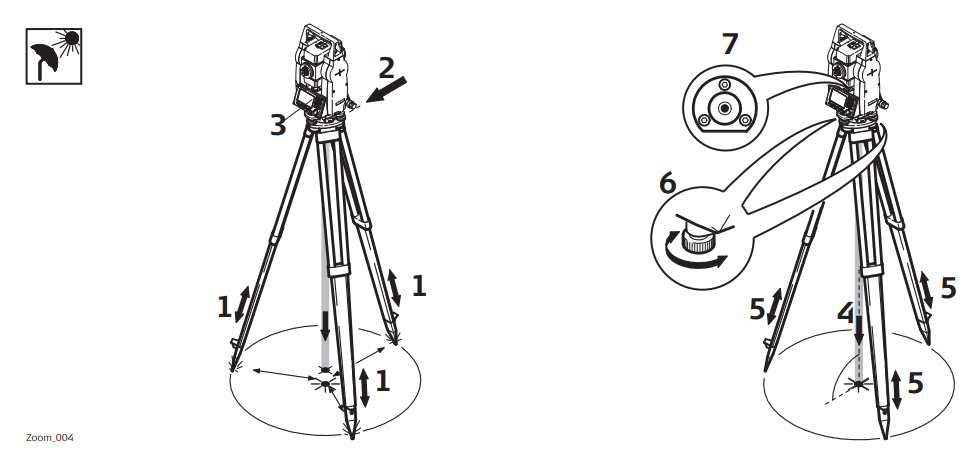
Extend the tripod legs to allow for a comfortable working posture. Position the tripod over the marked ground point, centering it as best as possible.
Fasten the tribrach and instrument onto the tripod
Turn on the instrument, and, if tilt correction is set to 1- or 2-axis, the laser plummet will be activated automatically, and the Level Up screen appears. Otherwise, press FNC from within any application and select Level.
Move the tripod legs (1) and use the tribrach footscrews (6) to center the plummet (4) over the ground point.
Adjust the tripod legs (5) to level the circular level (7).
By using the electronic level, turn the tribrach footscrews (6) to precisely level the instrument.
Center the instrument precisely over the ground point by shifting the tribrach on the tripod plate (2).
Repeat steps 6. and 7. until the required accuracy is achieved.
Level up with electronic level using GeoMax Toolkit
The electronic level can be used to precisely level up the instrument using the footscrews of the tribrach.
The bubble of the electronic level appears if the instrument tilt is inside a certain levelling range.
Turn the instrument until it is parallel to two footscrews.
Center the circular level approximately by turning the footscrews of the tribrach.
Turn on the instrument, and, if tilt correction is set to 1- or 2-axis, the laser plummet will be activated automatically, and the Level Up screen appears. Otherwise, press FNC from within any application and select Level.
Center the electronic level of the first axis by turning the two footscrews. When the electronic level is centered, the indicator on one of the electronic bubbles is centered.
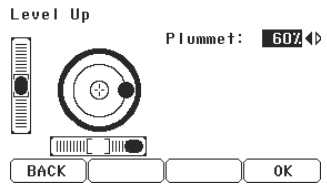
Center the electronic level for the second axis by turning the last footscrew. When the electronic level is centered, the indicator on the second electronic bubble is centered.
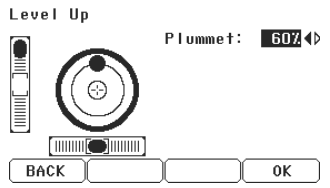
When the electronic level is centered the instrument has been perfectly levelled up. Accept with OK.
Change the intensity of the laser plummet
External influences and the surface conditions may require the adjustment of the intensity of the laser plummet.
In the Level Up screen, adjust the intensity of the laser plummet using the navigation key. The laser can be adjusted in 25% steps as required.