
Orthophoto on Plane
This function helps to generate an Orthophoto from a X-Photo session on a plane defined by an existing clipbox.
First, you need to create a clipping box (see Clipping boxes )
Once the clipbox is define click Imaging.
Click Orthophoto on Plane

Select the settings from the new proprieties panel on the right.
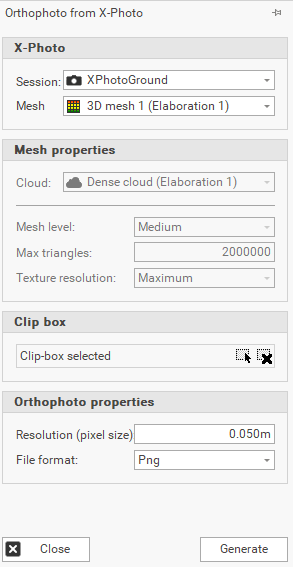
Session: select the X- PHOTO session available in Project Manager.
Mesh: mesh to use from the selected X-PHOTO session or select <new mesh>.
Cloud: the cloud to use to generate the mesh, in case it is selected <new mesh>.
Mesh level: the level quality of the mesh, in case it is selected <new mesh>.
Max triangles: the maximum number of triangles of the mesh, in case it is selected <new mesh>.
Texture resolution: the mesh texture resolution, in case it is selected <new mesh>.
Clip box: select the clipping box by clicking on
 , from the CAD window.
Resolution (pixel size): to set the pixel size of the orthophotos. The resolution of the generated image is larger if the size of the pixels is smaller.
File format: you can choose from JPG, PNG and GEOTIFF.
Click Generate to get your orthophoto.

The orthophoto is automatically saved in the Project Manager. You can delete an orthophoto with the delete command on the Project Manager.