-
A project can contain different subprojects within the same category.
-
The data for each subproject is handled differently according to its type. Subprojects include both graphic data and attribute entities.
-
While working, a survey and design subprojects are active. The data is saved to these subprojects; for example, when drawing a polyline, it is saved in the active drawing subproject, and when inserting a topographic point, it is saved in the active survey subproject.
-
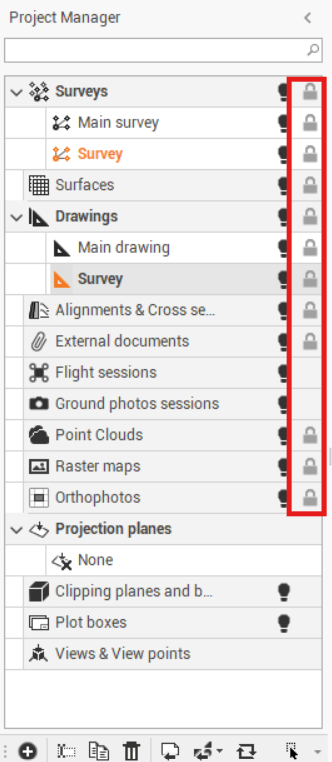
The Project Manager is the tool that helps to manage all subprojects in the workspace. Active subprojects are highlighted. in the Project Manager panel.
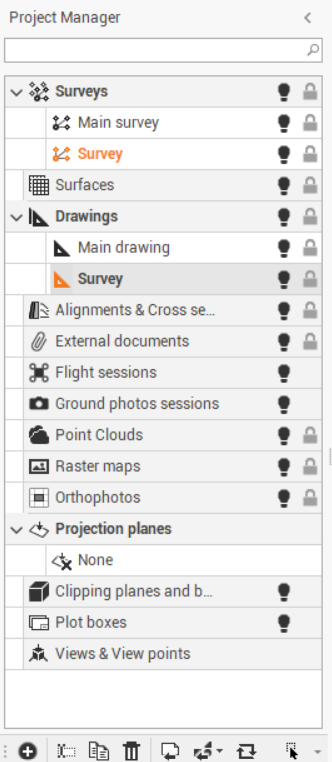
Subprojects categories are:
|
Subproject |
Description |
|---|---|
|
Survey |
Holds data from the topographic survey.
|
|
Surfaces |
Holds data from:
The objects of this type are:
|
|
Drawing |
Holds graphic data, for example:
|
|
Alignments & Section groups |
Holds:
|
|
External references |
External documents linked to the project, such as .ifc or .dwg files |
|
Point Clouds |
Display the connection to the file of the cloud data |
|
Raster image |
Holds background raster images that can be loaded into the
|
|
Orthophoto |
Collects orthophotos used in the project. The images are only linked to the project. |
Locking a subproject
When a subproject is locked, its objects cannot be selected.
To lock/unlock a subproject:
-
From the project manager, navigate to the list of all subprojects stored in the job
-
Click on the lock icon next to the desired subproject, to active or deactivate it.