
-
The battery must be charged before using it for the first time.
-
Zenith16/40 has a compartment for the battery.
-
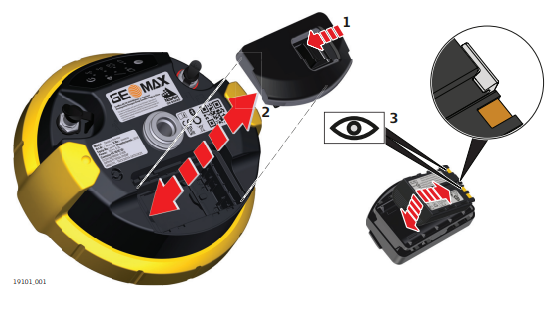
The battery is inserted in the bottom part of the GNSS receiver.
-
Push the slide fastener of the battery compartment in the direction of the arrow with the open-lock symbol.
-
Remove the cover from the battery compartment.
-
With the battery contacts facing upwards, slide the battery into the cover of the battery compartment.
-
Push the battery downwards so that it locks into position.
-
Insert the cover of the battery compartment into the compartment and push the slide fastener in the direction of the arrow with the close-lock symbol.
-
To remove a battery, push the slide fastener of the battery compartment in the direction of the arrow with the open-lock symbol and remove the cover.
-
Push the battery slightly upwards and at the same time pull out the bottom part of the battery. This releases the battery from its fixed position.
-
Remove the battery.