
-
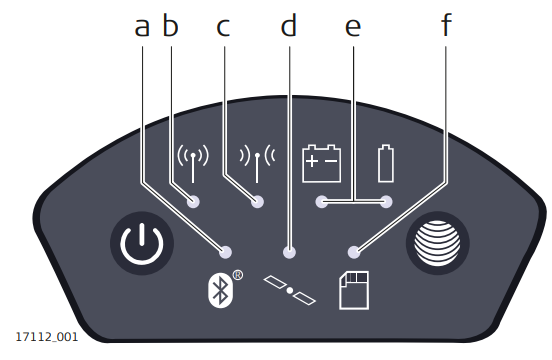
Zenith16/40 has LED indicators. They indicate the basic instrument status.
-
Bluetooth LED
-
RTK Base LED
-
RTK Rover LED
-
Position LED
-
Power LEDs
-
Storage LED
-
-
Bluetooth LED:
-
Green: Bluetooth is in data mode and ready for connecting.
-
Blue: Bluetooth has connected.
-
-
RTK Base LED:
-
Green: the GNSS receiver is in RTK base mode. No RTK data is being passed to the interface of the communication device.
-
Flashing green: the GNSS receiver is in RTK base mode. Data is being passed to the interface of the communication device.
-
-
RTK Rover LED:
-
Green: GNSS receiver is in rover mode. No RTK data is being received at the interface of the communication device.
-
Flashing green: the GNSS receiver is in rover mode. RTK data is being received at the interface of the communication device.
-
-
Position LED:
-
Off: no satellites are tracked.
-
Flashing yellow: fewer than four satellites are tracked, a position is not yet available.
-
Yellow: a navigated position is available.
-
Flashing green: a code-only position is available.
-
Green: a fixed RTK position is available.
-
-
Power LED:
-
Off: battery is not connected, flat or the GNSS receiver is switched off.
-
Green: power is 20% - 100%.
-
Red: power is 5% - 20%. The remaining time for which enough power is available depends on the type of measurement, the temperature and the age of the battery.
-
Fast flashing red: power is low (<5%).
-
-
Storage LED:
-
Off: no microSD card is inserted.
-
Green: microSD card is inserted but no raw data is being logged.
-
Flashing green: raw data is being logged.
-
Flashing red: raw data is being logged but only 5% memory left.
-
Red: microSD card is full, no raw data is being logged or no microSD card is inserted but the GNSS receiver is configured to log raw data.
-