
-
Use the command Text to create single line text, specifying the insertion point.
-
Click Draw.
-
Click Text.

-
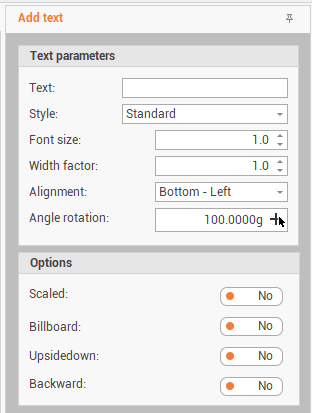
The function opens a panel on the right of the graphic view.
-
Confirm the text creation options:
-
Text: the text to enter.
-
Style: selects from the drop-down list the available text style.
-
Font size: the size of the text font.
-
Width factor: the width of the text is based on a factor of the letter width defined by the font. This definition that predefined width can be alter by the factor entered here.
-
Alignment: the text alignment referred to the insertion point of the text.
-
Angle rotation: the rotation angle of the text.
-
Scaled: if enabled, the created text is scaled based on CAD scale factor.
-
Billboard: if enabled, the created text is always seen frontally even in 3D views.
-
Upside down: the entered text is created upside-down.
-
Backward: the entered text is created backward.
-
-
Click on the graphic view, to specify the text insertion point.