
-
Use the command Style to open the Text style manager, to edit or create new text styles.
-
Click Draw.
-
Click Styles.

-
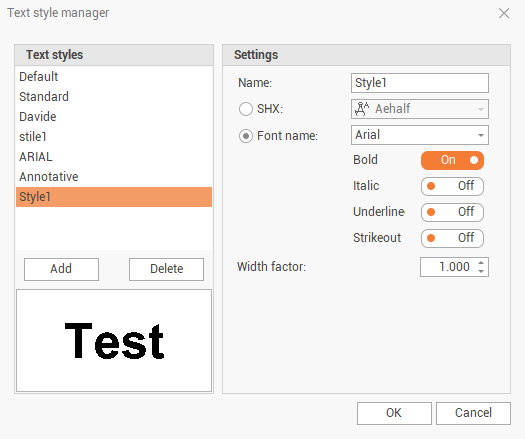
The Text style manager panel is opened.
-
From the Text styles, click on Add to create a new style, or select an existing style to edit. Click on Delete to delete the selected style.
-
Name: the name of the style.
-
SHX: selects a drawing font (the SHX fonts are lighter than Windows TrueType fonts).
-
Font name: selects a Windows TrueType font.
-
Bold: if enabled, the entered text is in bold.
-
Italic: if enabled, the entered text is in italic.
-
Underline: if enabled, the entered text is underlined.
-
Strikeout: the entered text is crossed out.
-
Width factor: the width of the text is based on a factor of the letter width defined by the font. The predefined width can be altered by the factor entered here.