
-
Label styles window allows to define the style and the labels to be used with Labels command.
-
Click Draw.
-
Click Styles.

-
In the Label styles panel it is possible to create or edit label styles for points, objects or polygons.
Points style
-
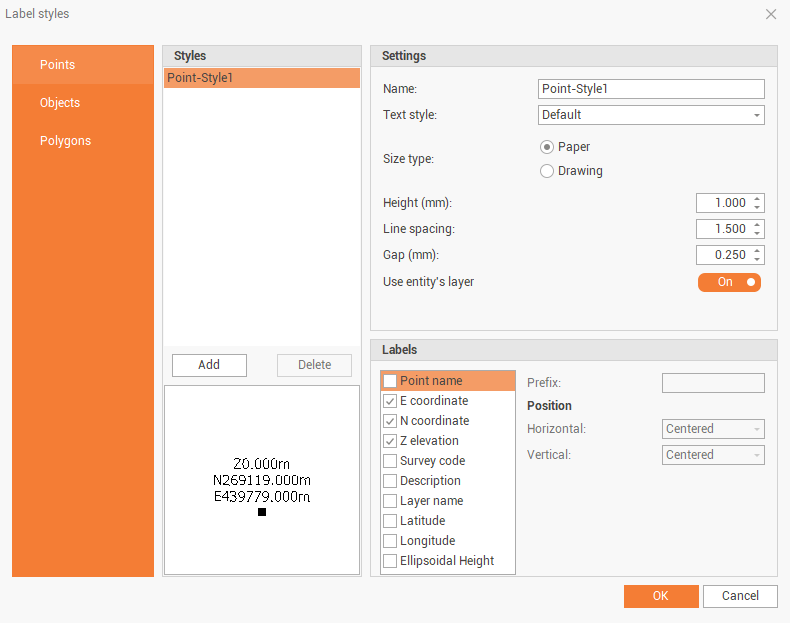
The Points page allows to customize the style for points labels.
Styles
-
Add: creates a new style.
-
Delete: deletes selected style.
Settings
-
Name: the name of current style.
-
Text style: the text style of the label. Click to select the text style from available styles.
-
Size type: changes the size type from the unit used in paper or in drawing.
-
Height: the height of the label text.
-
Line spacing: the line spacing of the label text.
-
Gap: the distance between the label text and the line connecting the point to the label.
-
Use entity’s layer: if enabled, use the layer of the selected point.
Labels
-
Labels: activates the labels to write.
-
Prefix: for same label, you can edit the prefix.
-
Position: the label position.
Objects style
-
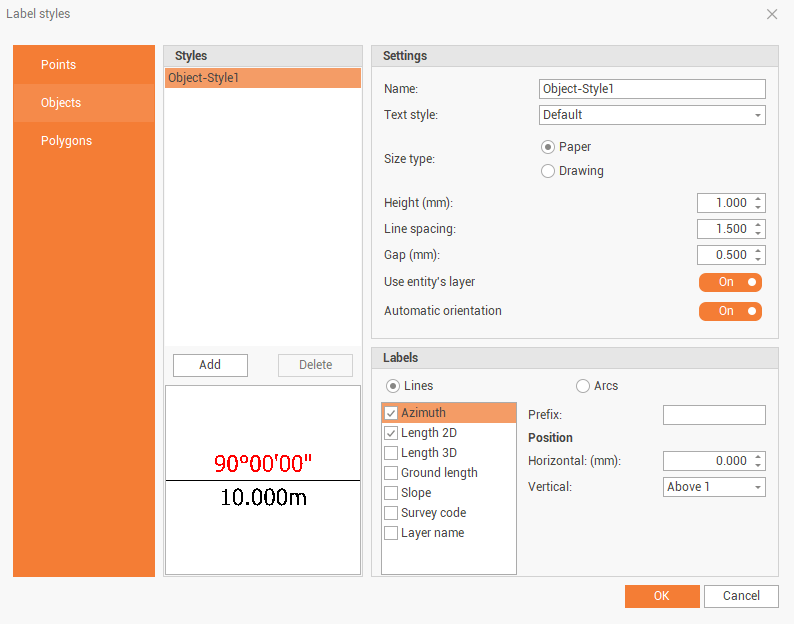
The Object page allows to customize the style for objects labels.
Styles
-
Add: creates a new style.
-
Delete: deletes selected style.
Settings
-
Name: the name of current style.
-
Text style: the text style of the label. Click to select the text style from available styles.
-
Size type: changes the size type from the unit used in paper or in drawing.
-
Height: the height of the label text.
-
Line spacing: the line spacing of the label text.
-
Gap: the distance between the label text and the object.
-
Use entity’s layer: if enabled, use the layer of the selected point.
-
Automatic orientation: if enabled automatically orient the text according to the 2D view.
Labels
-
Labels: activates the labels to write for lines and arcs.
-
Prefix: for same label, you can edit the prefix.
-
Position: the label position.
Polygons style
-
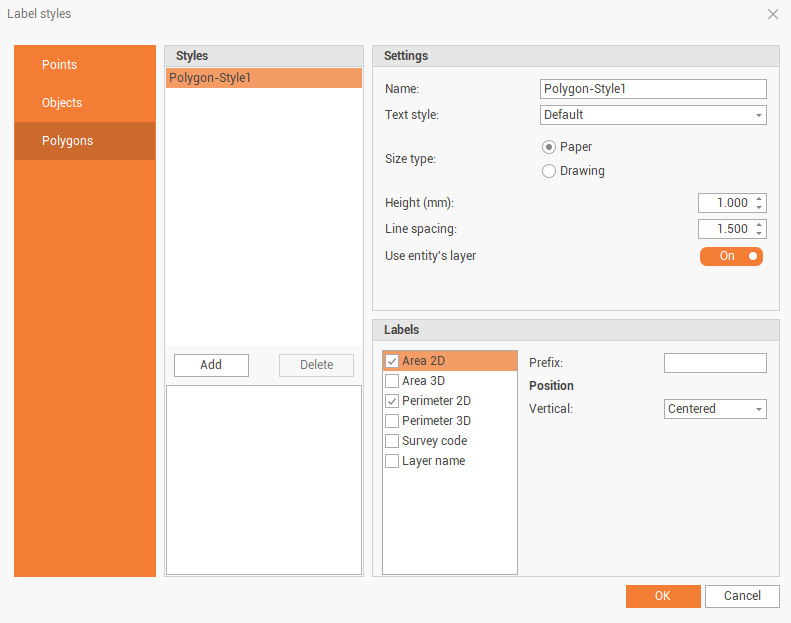
The Polygon page allows to customize the style for polygons labels.
Styles
-
Add: creates a new style.
-
Delete: deletes selected style.
Settings
-
Name: the name of current style.
-
Text style: the text style of the label. Click to select the text style from available styles.
-
Size type: changes the size type from the unit used in paper or in drawing.
-
Height: the height of the label text.
-
Line spacing: the line spacing of the label text.
-
Use entity’s layer: if enabled, use the layer of the selected point.
Labels
-
Labels: activates the labels to write.
-
Prefix: for same label, you can edit the prefix.
-
Position: the label position.
GIS Data style
-
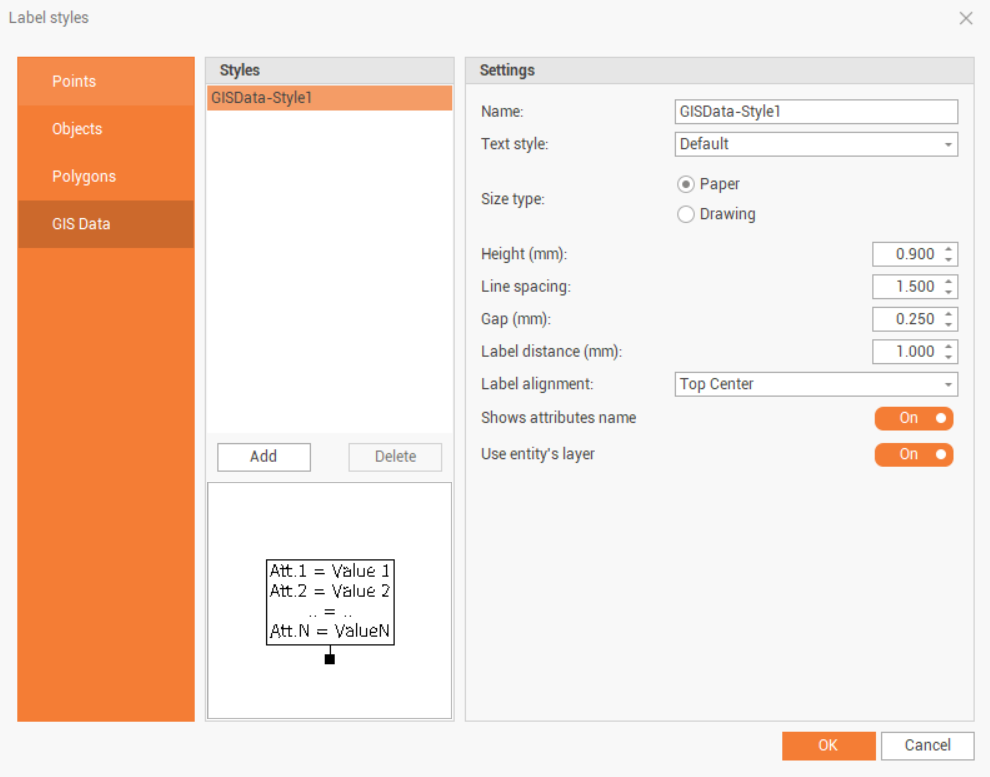
The GIS Data page allows to customize the style for GIS data labels.
Styles
-
Add: creates a new style.
-
Delete: deletes selected style.
Settings
-
Name: the name of current style.
-
Text style: the text style of the label. Click to select the text style from available styles.
-
Size type: changes the size type from the unit used in paper or in drawing.
-
Height: the height of the label text.
-
Line spacing: the line spacing of the label text.
-
Gap (mm): the distance between the text and the box.
-
Label distance (mm): the distance between the point and the box.
-
Label alignment: the alignment of the label text.
-
Show attribute name: enables the visualization of the name of the attributes.
-
Use entity’s layer: if enabled, use the layer of the selected point.