
The program can create orthophotos using the command Generate.
-
Click Imaging.
-
Click Generate.

-
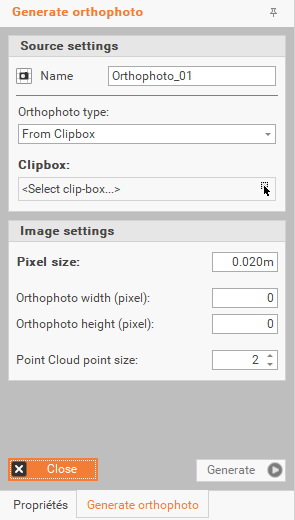
The command activates the options panel on the right, where you can perform the following operations.
-
Name: allows you to assign a name to the orthophoto.
-
Orthophoto type:
-
From Top-View: a clipbox is not required; the orthophoto can be generated immediately.
-
From Clipbox: enables the use of a Clipbox for generating the orthophoto.
-
Select Clipbox: allows to select the Clipbox from the CAD window by clicking on the icon.
-
-
From Cross-Section: enables the use of cross sections for generating the orthophoto.
-
Select Cross-Section: allows to select the cross-section from the CAD window by clicking on the icon.
-
Section Thickness: enabled only if you select "Select Cross-Section." Allows you to set the depth beyond the cross-sectional plane for the section.
-
-
-
Pixel Size: allows to set the pixel size for the orthophoto. The resolution of the generated image will be higher if the pixel size is smaller.
-
Orthophoto Width (Pixel): displays the width of the generated orthophoto.
-
Orthophoto Height (Pixel): displays the height of the generated orthophoto.
-
Point Cloud point size: allows to adjust the size of the points in the point cloud.
-
Generate: initiates the generation of the orthophoto.
-
Close: ends the command
-