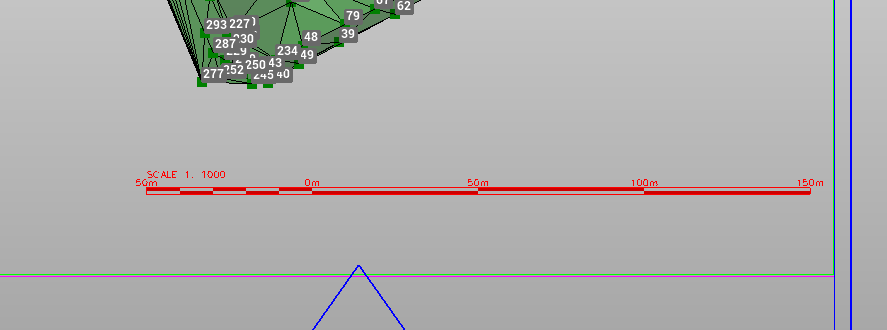
Add Scale bar allows to add a scale bar in the graphic view, to be printed within the plot box.
The scale bar dimensions depends on the project scale factor.
-
Click Output.
-
Click Add Scale bar.
-
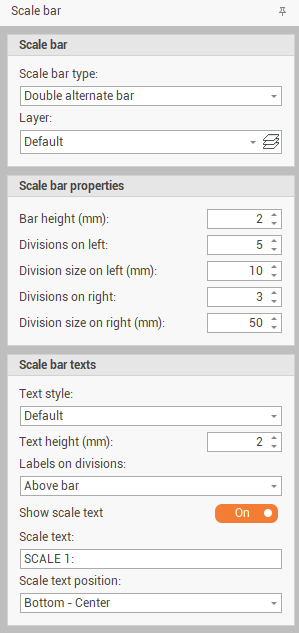
This command opens a new panel on the right:
-
Scale bar type: to select from a list the design of the scale bar.
-
Layer: sets the layer where scale bar is created.
-
Divisions on left: the number of scale bar divisions from 0 to the left side of the bar.
-
Division size on left (mm): the size of each left division.
-
Divisions on right: the number of scale bar divisions from 0 to the right side of the bar.
-
Division size on right (mm): the size of each right division.
-
Text style: the style of the text on the scale bar from available text styles.
-
Text height: the height of the text.
-
Labels on divisions: where the labels are placed if above or below the bar, or not enter any label.
-
Show scale text: enables/disables the scale bar value on the bar.
-
Scale text: the value of the scale bar text to display.
-
Scale text position: the position of the scale text.
-
-
Click on graphic view to insert the scale bar.