
Delete data command is used to delete data from a selected Surface subproject.
-
Click Surface.
-
Click Delete data.

-
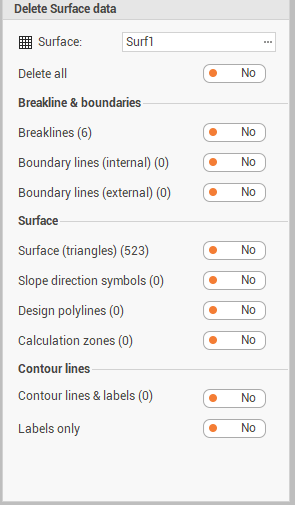
The command opens a new panel.
-
Surface: the Surface subproject from which to delete the data.
-
Delete all: enable it to select all entities from the subproject.
-
Breaklines: to delete breaklines from the subproject.
-
Boundary lines (internal): to delete internal boundary lines from the subproject.
-
Boundary lines (external): to delete external boundary lines from the subproject.
-
Surface (triangles): to delete surface triangles from the subproject.
-
Slope direction symbols: to delete slope symbols from the subproject.
-
Design polylines: to delete cut/fill polylines from the subproject.
-
Calculation zones: to delete calculation zones from the subproject.
-
Contour lines & labels: to delete contour lines and labels of the contour lines from the subproject.
-
Labels only: to delete contour lines labels.
-
-
Click Delete to confirm and proceed.
The data is permanently deleted and cannot be restored with Undo.