
The surfaces subproject has several properties and parameters.
-
Click Surfaces.
-
Click Settings.

-
This command opens a new window.
-
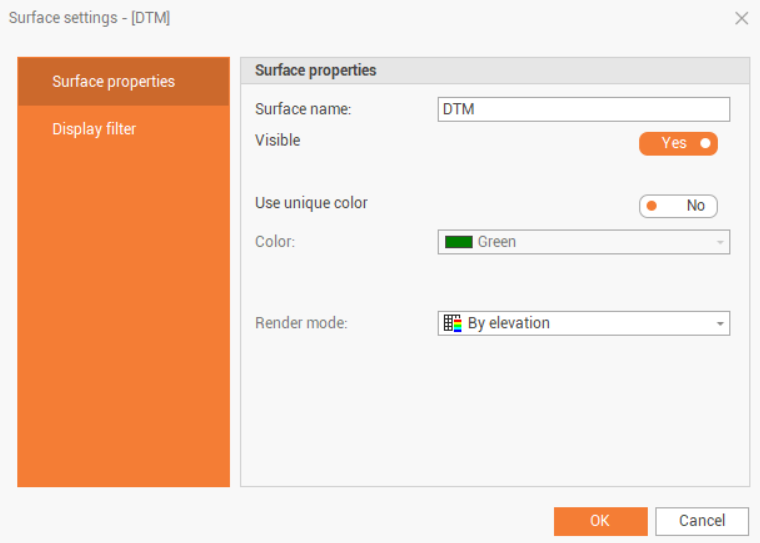
Surface properties allows to change the properties of the active surface subproject.
-
Surface name: the name of the current surface subproject.
-
Visible: toggles display of subproject entities.
-
Use unique color: toggles the display of all subproject entities with a chosen color.
-
Color: sets the color for the displaying of entities.
-
Render mode: sets the method by which the program should associate the color with triangles. The options are:
-
Fixed color: applies the standard color settings for the entity.
-
By elevation: applies the color gradation according to the Elevation colors setting.
-
True color: if the surface has been colored by texture or by Point clouds you can see the original color.
-
Texture: applies a texture (raster) to the surface of triangles.
-
-
-
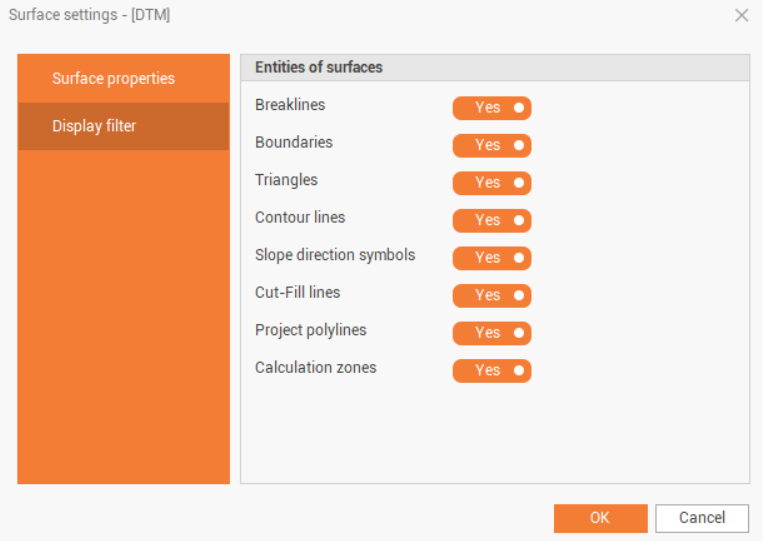
Display filters allow you to show or hide subproject entities without having to turn layers on or off, and unlike layers, they only act on entities of the selected type.
-
Breaklines: toggles the display of breaklines.
-
Boundaries: toggles the display of boundary lines.
-
Triangles: toggles the display of surface triangles.
-
Contour lines: toggles the display of contour lines.
-
Slope direction symbols: toggles the display of slope symbols.
-
Cut-Fill lines: toggles the display of cut-fill lines.
-
Project polylines: toggles the display of the design polylines.
-
Calculation zones: toggles the display of the calculation zones.
-