
Instrument components
-
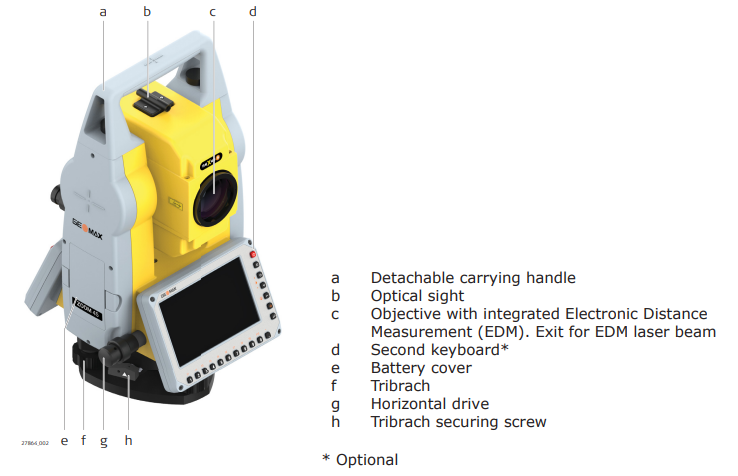
Below picture shows the instrument components from instrument face II.
-
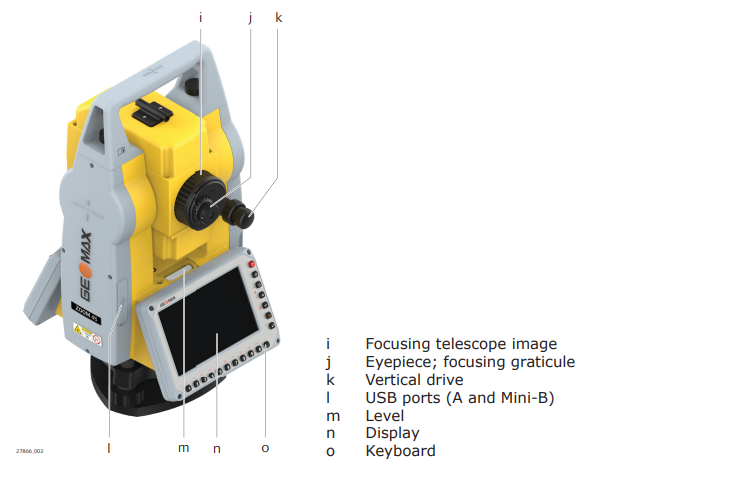
Below picture shows the instrument components from instrument face I.
User interface
-
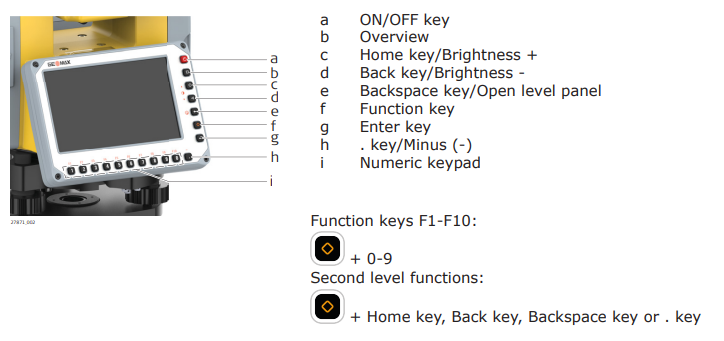
Keyboard.
-
Keys:
-
On/Off
: turns instrument on and off.
-
Overview
: allows users to quickly access and switch between recently opened apps.
-
Home
: switches to home menu.
-
Back
: quits a screen or edit mode without saving changes. Returns to next higher level.
-
Backspace
: deletes the character to the left of the cursor.
-
Function
: allows to access second level functions.
-
Enter
: confirms an entry and continues to the next field. In X-PAD software allows to take a measurement.
-
: enters the decimal separator.
-
Numeric keys: enters numbers.
-
-
Second level functions:
-
+
: increases brightness.
-
+
: decreases brightness.
-
+
: accesses to the level; only possible in particular software screens.
-
+
: enters the minus (-).
-
+
: utilizes the function keys F1-F10; functions can also be accessed by long-pressing one of the numerical keys without pressing the function key.
-
Function keys F1-F10 can be customized in X-PAD software to access special functions (measure and store, change target, etc..).