
-
Zoom75/95 instruments can communicate with external devices by a Bluetooth connection. The instrument Bluetooth is a slave only. The Bluetooth of the external device will be the master, and therefore will control the connection and any data transfer.
-
On the instrument, ensure that the communication parameters are set to Internal Bluetooth or Bluetooth Handle. Refer to ...
-
Some devices ask for the identification number of the Bluetooth. The default number for a Zoom75/95 Bluetooth is 0000. This can be changed in the Toolkit inside the Communication page.
Depending on the method to use for the connection, the BT name changes:
-
If connection is done to internal bluetooth the BT name is Z95_xxxx
-
If connection is done to long range BT handle the BT name is ZRT_xxx
The long range BT handle
-
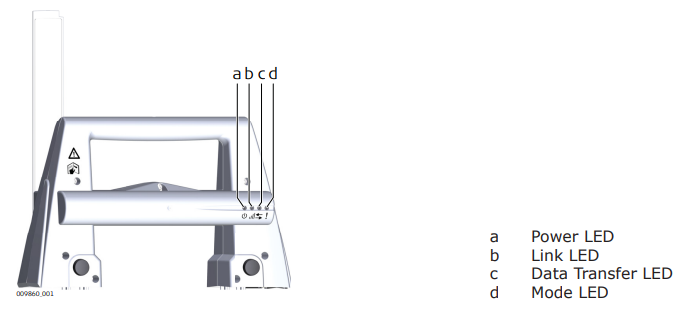
The RadioHandle has Light Emitting Diode indicators. They indicate the basic RadioHandle status.
-
Power LED:
-
Off: power is off.
-
Green: power is on.
-
-
Link LED:
-
Off: no radio link to field controller.
-
Red: radio link to field controller.
-
-
Data Transfer LED:
-
Off: no data transfer to/from field controller.
-
Green or green flashing: data transfer to/from field controller.
-
-
Mode LED:
-
Off: data mode.
-
Red: configuration mode.
-
-