
Delete command is used to delete data from a selected Survey subproject, for example measurements and points.
-
Click Survey.
-
Click Delete.

-
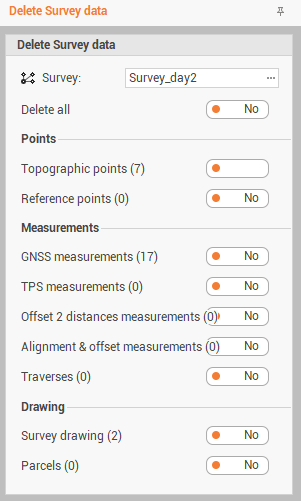
The command opens a new panel.
-
Survey: the Survey subproject from which to delete the data.
-
Delete all: enable it to select all entities from the subproject.
-
Topographic points: to delete topographic points from the subproject.
-
Reference points: to delete reference points from the subproject.
-
GNSS measurements: to delete GNSS measurements from the subproject.
-
TPS measurements: to delete TPS measurements from the subproject.
-
Offset 2 distances measurements: to delete measurements by offset distance-distance from the subproject.
-
Alignment & offset measurements: to delete mesurements by alignment and offset from the subproject.
-
Traverse: to delete traverses from the subproject.
-
Survey drawing: to delete survey drawing from the subproject.
-
Parcels: to delete parcels from the subproject.
-
-
Click Delete to confirm and proceed.
The data is permanently deleted and cannot be restored with Undo.