
Move GNSS base command moves the position of the GNSS base entering new coordinate or shift values.
-
Click Survey.
-
Click Move GNSS base.

-
The command requires the input of the relocation data in the right-side panel. It is possible to choose several options to perform the re positioning.
-
New coords LLH.
-
Shift LLH (from current).
-
New coords ENZ.
-
Shift ENZ (from current).
-
When the base is moved, also the connected baselines and rover points are moved.
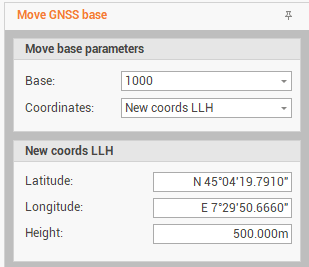
New coords LLH
-
Sets the new latitude, longitude and height of the base.
-
Enter the requested parameters:
-
Base: select the base to be moved.
-
Coordinates: choose the method to set the movement. Select New coords LLH to enter the new coordinates as latitude, longitude and ellipsoidal elevation.
-
Latitude: the new latitude of the base.
-
Longitude: the new longitude of the base.
-
Height: the new height of the base.
-
-
Click on Move to move the base and relative baselines
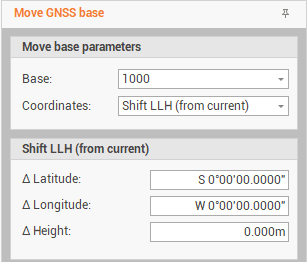
Shift LLH (from current)
-
Sets the difference in latitude, longitude and height to move the the base.
-
Enter the requested parameters:
-
Base: select the base to be moved.
-
Coordinates: choose the method to set the movement. Select Shift LLH (from current) to enter the shift as latitude, longitude and elevation.
-
Δ Latitude: the shift value to calculate the new latitude of the base.
-
Δ Longitude: the shift value to calculate the new latitude of the base.
-
Δ Height: the shift value to calculate the new latitude of the base.
-
-
Click on Move to move the base and relative baselines
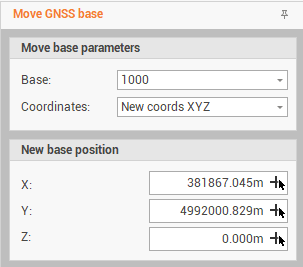
New coordinate ENZ
-
Defines the new ENZ coordinates of the base.
-
Enter the requested parameters:
-
Base: select the base to be moved.
-
Coordinates: choose the method to set the movement. Select New coords XYZ to enter the shift as latitude, longitude and elevation.
-
E: sets the new east coordinate of the base. You can select the new location in the graphics view by pressing the button

-
N: sets the new north coordinate of the base. You can select the new location in the graphics view by pressing the button
-
Z: sets the new elevationt coordinate of the base. You can select the new location in the graphics view by pressing the button
-
-
Click on Move to move the base and relative baselines
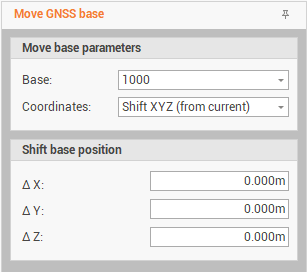
Shift ENZ (from current)
-
Sets the difference for the east, north and elevation coordinates to move the base.
-
Enter the requested parameters:
-
Base: select the base to be moved.
-
Coordinates: choose the method to set the movement. Select Shift ENZ (from current) to enter the shift as latitude, longitude and elevation.
-
ΔE: sets the shift value to calculate the new east coordinate of the base.
-
ΔN: sets the shift value to calculate the new north coordinate of the base.
-
ΔZ: sets the shift value to calculate the new elevation coordinate of the base.
-
-
Click on Move to move the base and relative baselines