
Supported export file formats
 |
|  |
| 
To export data from the current job open Job.
Click Export & Share.
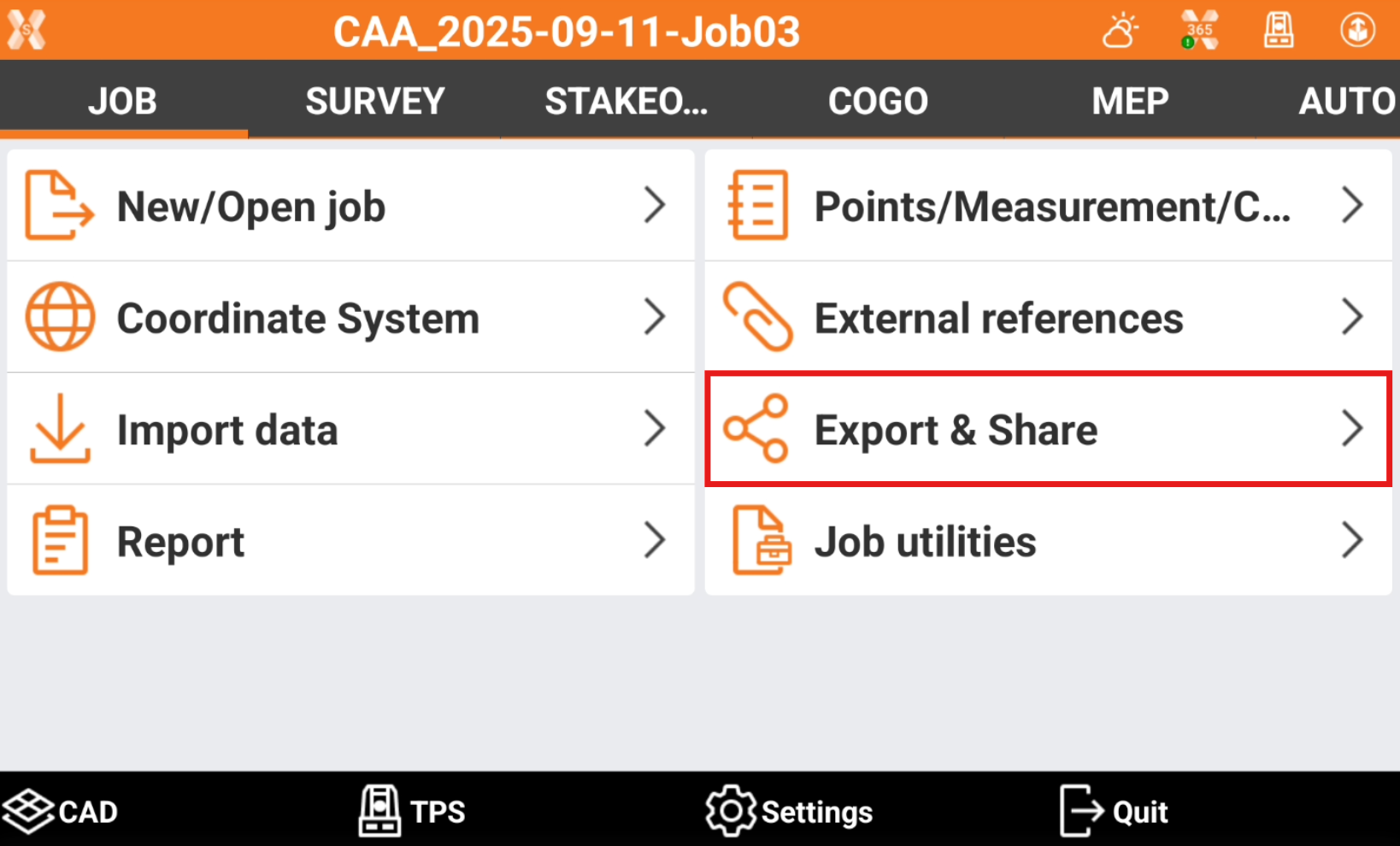
Select the format to export the data.
Standard data format: this page list the standard format to export the data.
X-PAD Exchange format: exports the data in xpad format. The format ensures better data transfer and collaboration between office and field software.
Drawing DXF: exports points and draing in the standard DXF format.
Text file (ASCII): exports different data in a customized formatted text file.
LandXML: exports the data in the standard LandXML format.
HeXML: exports the data in the HeXML format.
ESRI shape file: exports the data in ESRI Shape format.
Google Earth KML/KMZ: exports the data in Google Earth KML or KMZ formats.
GSI Format: exports points and measurements in the GSI format.
Garmin GPX format: exports topographic points in the GPX format.
Leica IDX/IDEX: exports topographic points in Leica IDX/IDEX format.
Sokkia SDR format: exports topographic points in the Sokkia SDR format.
Carlson SurvCE RW5/CRD/CRDB: exports data in SurvCE RW5/CRD/CRDB formats.
Trimble/Geodimeter format: exports the file in IDS format. (Only visible if language is Swedesh, Norwegian, Finnish)
GNSS Vector Exchange File Format (GVX): exports GNSS measurement data in GVX format. This NGS (National Geodetic Survey, USA) defined format allows users to integrate RTK Vectors into OPUS-Projects along with static data for combined network least squares adjustment. (Only visible if language is English US)
Berlin Protokoll: exports the data in BER format. (Only visible if language is German)
Desktop format: lists the formats that are commonly used in surveying office software.
STAR*NET format: exports the data in DAT format for office software STAR*NET.
12D format: exports the data in FLD format for 12D software.
N4ce format (.exp): exports the data in EXP format for N4ce surveying software. (Only visible if language is English or English UK)
N4ce format (.raw): exports the data in RAW format for N4ce surveying software. (Only visible if language is English or English UK)
LSS (DTM): exports the data in 001 format for LSS software. (Only visible if language is English or English UK)
LISCAD: exports the data in RAW format for LISCAD software.
GEOGraf: exports the data in PKT format. (Only visible if language is German or German ITA)
MDD format: exports the data in MDD format. (Only visible if language is German or German ITA)
DandasTV: exports the format in XML format for DANDAS. (Only visible if language is Danish)
V1Civil3D: exports the data in TXT format for Civil3D V1. (Only visible if language is Danish)
V2Civil3D: exports the data in TXT format for Civil3D V2. (Only visible if language is Danish)
SDL format: exports the data in PKT or OBS format. (Only visible if language is Danish)
TPLAN format: exports the data in TPLAN (DPI) format. (Only visible if language is Bulgarian)
Local format: lists the formats that are used only locally in some countries.
SBG Geo data: exports points or surface in SBG GEO/PXY/TRM format. (Only visible if language is Swedish, Finnish, English, English UK, Danish)
KOF format: exports the data in KOF format. (Only visible if language is Swedesh, Norwegian, Finnish)
KOF50 format: exports the data in KOF50 format. (Only visible if language is Swedish, Norwegian, Finnish)
Topko (1200/VIVA): exports the data in TXT format. Can be imported in Topko software as Leica System 1200/VIVA format. (Only visible if language is Italian)
LGE (1200/VIVA): exports the data in TXT format. Can be imported in LGE software as Leica System VIVA format. (Only visible if language is Italian)
Meridiana (1200/VIVA): exports the data in CST format. Can be imported in Meridiana software as Leica 1200/VIVA format. The file has to be imported in Meridiana in File -> Importa -> Strumento -> File GNSS -> Altri -> Leica Geo Office - Meridiana format. (Only visible if language is Italian)
Leonardo (1200/VIVA): exports the data in CST format. Can be imported in Leonardo software as Leica 1200/VIVA format. (Only visible if language is Italian)
GeoMAP: exports the data in GeoMAP (TXT) format. (Only visible if language is Lithuanian)
NetCAD NCN: exports the data in NetCAD NCN format. (Only visible if language is Turkish)
NetCAD YDE: exports the data in NetCAD YDE format. (Only visible if language is Turkish)
RTK GNSS format: exports the data in RTK format. (Only visible if language is Latvian)
VZD GNSS format: exports the data in VZD (TXT) format. (Only visible if language is Latvian)
MicroStation format: exports the data in MicroStation MUC format. (Only visible if language is Latvian)
3D System format: exports the data in 3D System (TXT) format. (Only visible if language is Swedish or Finnish)
Trimble NIS: exports the data in Trimble NIS, Trimble NIS3D or Trimble NIS Elenia formats. (Only visible if language is Swedish or Finnish)
KLI format: exports data in KLI format. (Only visible if language is Swedish)
GT format: exports data in GT (XYZ) format. (Only visible if language is Swedish or Finnish)
Generator raportow RTK: generates the report in different formats. (Only visible if language is Polish)
Report RTK/RTN do Osdodka: generates the report in different formats. (Only visible if language is Polish)
M-GEO: exports the data in M-GEO (TXT) format. (Only visible if language is Polish)
GML: exports the data in GML format. (Only visible if language is Spanish)
MAPA2: exports the data in MAPA2 format. (Only visible if language is Czech)
SEMA: exports the data in SEMA format. (Only visible if language is German or German ITA)
SEMA Point: exports the data in SEMA Point format. (Only visible if language is German or German ITA)
Dataflor: exports the data in Datafor format. (Only visible if language is German or German ITA)
AASHTO SDMS format: exports the data in PRJ format. (Only visible if language is English US)