
-
EDM Settings allow to change the settings for the distance meter.
-
From the Main menu, select Settings to modify your work settings.
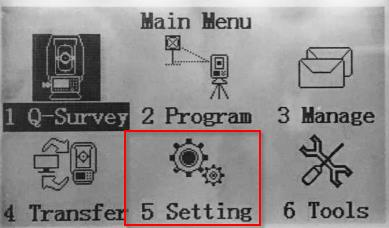
The page can also be accessed from different application pressing EDM.
-
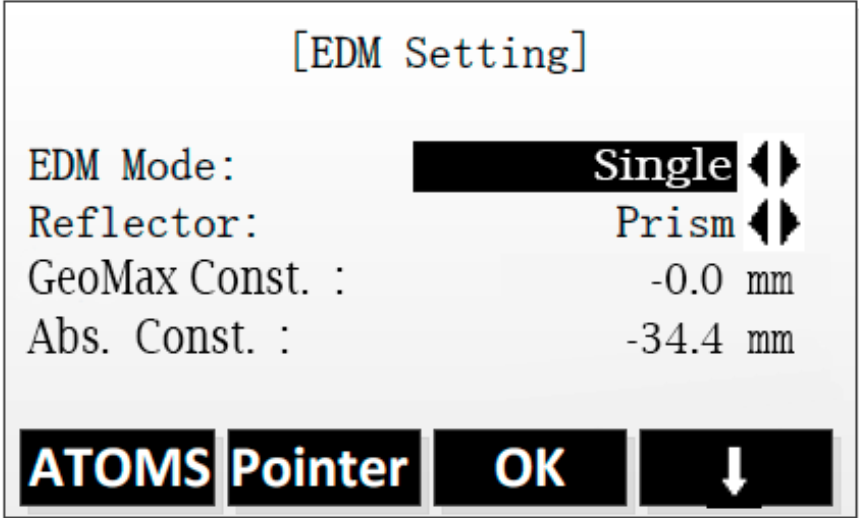
Select EDM to set the EDM settings:
-
EDM modes: changes the EDM mode.
-
Single: instrument performs a single measure.
-
Repeat: instrument repeats the measure,
-
Tracking: instrument measures continuously the distance.
-
3 times: instrument repeats the measure 3 times.
-
4 times: instrument repeats the measure 4 times.
-
5 times: instrument repeats the measure 5 times.
-
-
Reflector: selects the prism type:
-
Prism: the target is a prism.
-
Sheet: the target is a sheet.
-
No-prism: instrument measures in reflectorless mode.
-
-
GeoMax Const: the GeoMax/Leica prism constant.
-
Abs Const: the absolute prism constant.
-
-
The prism constant is an important characteristic of the reflector.
-
This constant, always given in [mm], is specific to the model and physically represents the constant difference between the measured value and the "exact" value.
-
This difference will be cancelled during the measurements by entering an "additive constant" in the total station.
-
There are two types of constants:
-
Prism constant: for GeoMax/Leica prisms (usually in positive values).
-
Absolute constant: for prisms of other manufacturers (usually in negative values).
-
-
The additive constants, of non GeoMax/Leica prisms, are often given in the true zero prism system. Whereas the GeoMax/Leica prisms are given in the Hexagon TPS prism system.
-
In order to switch from a system to another, we can use the following formula, that links these two constants:
-
GeoMax/Leica prism constant = Absolute prism constante + 34.4mm
-
Absolute prism constant = GeoMax/Leica prism constant – 34.4mm
-
Old instrument firmware shows as field P.C. which refers to the absolute prism constant.