
-
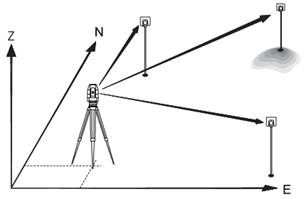
Also known as a free-station, Resection is an application used to determine the instruments position from measurements to known points, performing a station setup.
-
A minimum of 2 known points and a maximum of 10, can be used to determine the position.
Open resection program
-
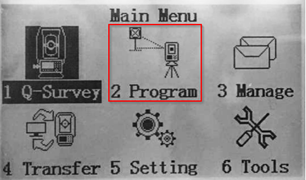
From the main page, select 2.Program, and then F3-Resection to start a free-station.
Job selection
-
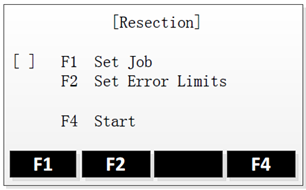
If the job has not been set yet, then you can select F1- Set Job, to either create a new job or choose an existing job from memory.
-
Clicking on OK will validate and return to the Surveying page.
Error limits
-
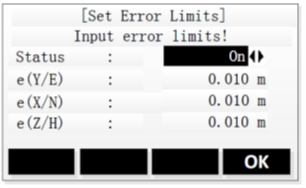
To activate the errors limits, select On as Status.
-
Input the 3 error limits, for X, Y & Z
-
Validate with OK.
-
And finally press F4-Start to start the free-station.
Station definition
-
Input a name for your free-station, and the instrument height and press OK
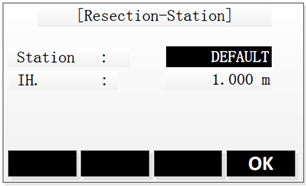
Selection of known points
-
Input the name of the first reference point, and the height of the target, and validate with OK.
-
For the name, you can either:
-
Search for an existing point by entering the point name (Find),
-
or select a point from the list of existing points (List),
-
or by manually entering the point’s coordinates (Coord.).
-
Measurement of known points
-
Aim your target and press ALL to take the measurement.
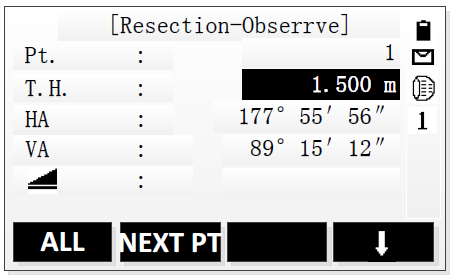
-
To set another known point, press NEXT PT and repeat the steps 5 & 6.
The results could be displayed once a minimum of 2 measured target points is reached.
Results
-
Press Result to calculate and display the station position.
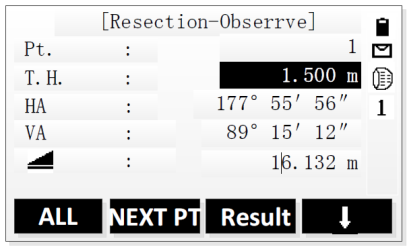
-
The results page gives an overview of the station position along with the standard deviations.
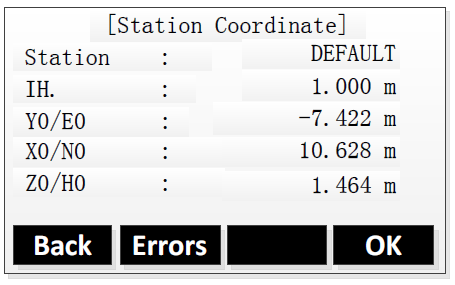
-
To add a measurement of another target point, press Back.
-
To display the standard deviations, press Errors.
-
To accept the result and set the station, press OK
-