
-
Stakeout is the main application to stakeout coordinates.
-
From the main page, select 2.Program, and then F2-Stakeout to start the stakeout.
To set the orientation, please follow the same steps as Survey
Once the orientation is set, the 3 pre-settings will be marked by [*], which means that you’re ready to start the stakeout (F4-Start)
-
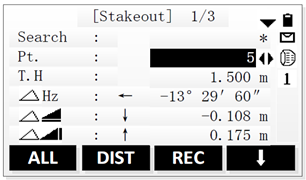
To start the stakeout, select F4-Start.
-
Follow these steps:
-
Set the EDM mode to Tracking (F4 twice then EDM), for real time readings, otherwise keep Standard mode.
-
Select the point to stakeout: either from Search, by typing the ID of the point directly in the Pt. field, or by inputting manually the coordinates (F4 then Coord.)
-
Enter the Target Height (T.H.)
-
Aim to the prism,
-
Press DIST and follow the instructions on the screen by moving the prism until the readings are close to zero
-
You can save the results by pressing REC
-
Repeat the previous steps to stakeout another point.
-