
This utility generates a new grid surface from a surface of reference. You can define the size of the grid and the rotation.
-
Click Surface.
-
Click Tools to open the menu.

-
Click Grid from surface.
-
The command opens a new panel on the right.
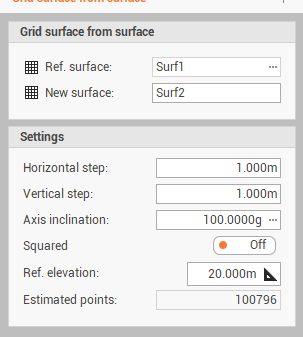
-
Ref. surface: indicates the surface subproject from which to extract the points.
-
New surface: creates a new surface subproject where the processing data will save.
-
Horizontal step: sets the horizontal step of the grid.
-
Vertical step: sets the vertical step of the grid.
-
Axis inclination: represents the direction of the grid; sets the value of the angle or indicate it in the CAD window by clicking on the button .
-
Squared: toggles the creation of a regular squared surface that does not follow the perimeter of the model.
-
Ref. elevation: sets the reference elevation to be assigned to the points that are generated externally to the model.
-
Estimated points: indicates the estimation of the number of points generated by the calculation.
-
-
Click Generate to generate the points.