
The utility Merge coincident points can be used to merge points with similar coordinates.
-
Click Survey.
-
Click Tools to open the menu.

-
Click Merge coincident points.
-
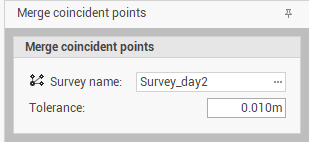
This utility opens a new panel.
-
In the Merge coincident points panel enter the following information:
-
Survey name: the survey subproject where to merge coincident points.
-
Tolerance: if points are within the defined tolerance, they will be merged.
-
-
Click on Merge.
-
If points are merged, the resulting point has an average coordinate between the 2 original points.