
The utility Rename points is used to rename all points in a Survey subproject entering a prefix, a suffix or increase the point number.
-
Click Survey.
-
Click Tools to open the menu.

-
Click Rename points.
-
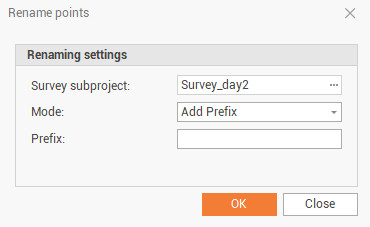
This utility opens a new window.
-
Survey subproject: the survey subproject.
-
Mode: the renaming mode.
-
Add prefix: add a prefix to the points. Define the prefix in the Prefix field.
-
Add suffix: add a suffix to the points. Define the suffix in the Suffix field.
-
Increment: rename the points defining a starting point ID and the numeric increment.
-
-
-
Click Ok to rename the point according to defined rule.