
-
Use the command Polyline to draw a polyline.
-
Click Draw.
-
Click Polyline.
-
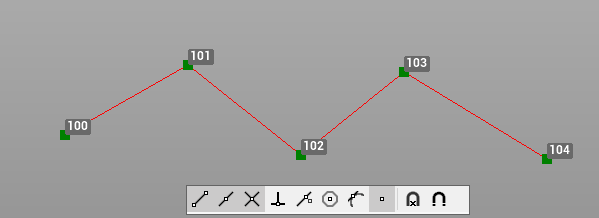
Click on graphic view to create the polyline. In the bottom bar of the graphic view you can activate/deactivate the object snap.
If this command is active
-
The command has properties that are activated by right-clicking in the CAD window:
-
Connect all points up to
: allows to specify the last point in the sequence. All intermediate points will be connected by the polyline. For example start the polyline clicking on point 100, then right-click and select this option and click on point 105. All intermediate points (101, 102, 103, 104) will be automatically connected.
-
Close
: allows to join the last vertex of the element drawn with the first. If the item was drawn by the polyline command, the option will create a closed polyline
-
Line - tangent
: adds a segment using the same direction as the previous element. To create a line as tangent to the previous arc.
-
Arc - tangent
: adds an arc tangent to the previous element.
-
Arc - no tangent
: adds an arc without the constraint of a tangent to the previous element.
-
Undo last point
: allows to delete the last vertex of the line or polyline.
-
Extend
: extends the object while keeping the same direction but using as a reference for extension length a reference point.
-
Intersection
: allows to extend the segment to the intersection with a reference direction.
-