



-
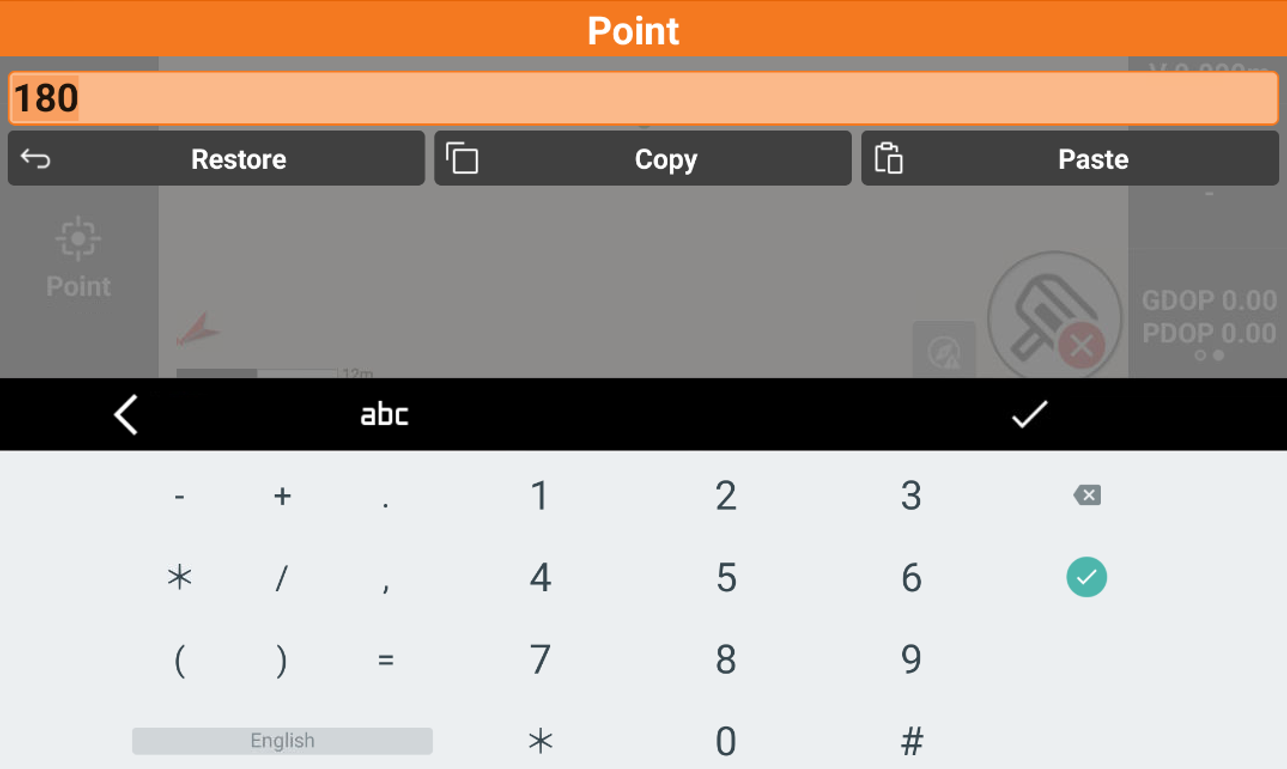
The virtual keyboard allows the insertion of letters, numbers and symbols.
-
To access the virtual keyboard from an input field, click inside the field itself.
-
Restore: allows to restore the starting value.
-
Copy: copies the value to the software clipboard.
-
Paste: pastes a value stored in the clipboard
-

-

-

-

-

-
-
Inserting latitude and longitude values
-
In the input fields representing latitude and longitude values, you have to insert values according to this rule: GG.MMSSssss
-
<sign>
-
+ For latitude North and longitude East.
-
For latitude South and longitude West.
-
-
GG: decimal degrees.
-
. : separator.
-
MM: two characters for minutes.
-
SS: two characters for seconds.
-
ssss: tenths of a second.
-
-
Examples:
-
12°34’56.7890 N 12.34567890
-
12°34’56.7890 S -12.34567890
-
123°45’56.7890 E 123.45567890
-
123°45’56.7890 W -123.45567890
-
Inserting fractional feet
-
Distance and coordinate values can be input as fractional feet. The accepted format is as follows: “<feet>'<inches> <fraction of an inch>”
-
Examples:
-
5 feet, 6 inches and one fourth 5' 6 1/4"
-