
-
Create one or more profiles related to echo sounders.
-
A profile for echo sounder is used in bathymetric surveys available in the Bathymetry module.
The software supports single and dual beam echosounders.
-
Click Settings.
-
Click Echosounder.
-
Click Add to create a new profile.
Profile page
-
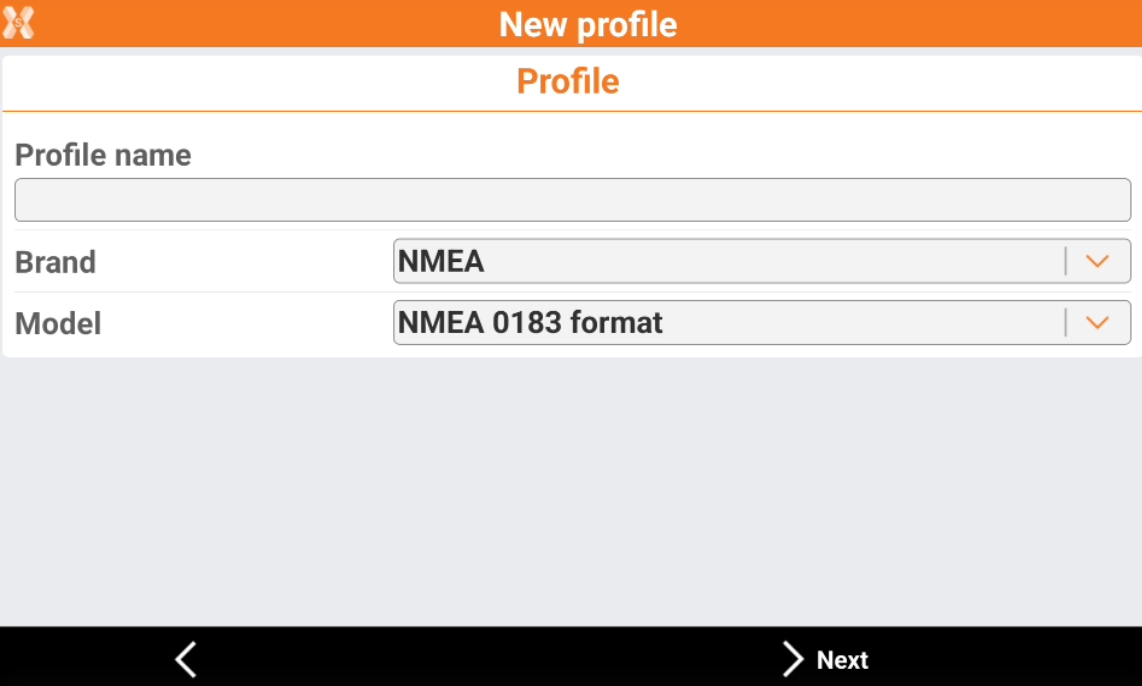
The Profile page allows to enter the information on the profile type and instrument connected.
-
Profile name: name to assign to the profile.
-
Brand: brand of the echo sounder. If the echo sounder stream out the data using the standard format NMEA, select NMEA as brand.
-
Model: model of the echo sounder.
-
Device page
-
The Device page allows to define how the device is connected to the software and search the device using the bluetooth.
-
Communication: select how the device communicate with X-PAD.
-
Bluetooth: the communication is by bluetooth.
-
USB-Serial adapter: the communication is with a USB to serial adapter connected to the Android controller.
-
USB-Bluetooth adapter: the communication is with a USB-Bluetooth adapter.
-
-
Device: name of the Bluetooth to connect.
-
-
To start a search in case the instrument is not in the list, click Add device.
Parameters page
-
The Parameters page allows to define the default speed of sound.
-
Default speed of sound: defines the default speed of sound in water.
-