



-
The software offers a tilt verification procedure useful in these cases:
-
The user wants to confirm the tilt measurement accuracy under current installation.
-
A different pole is used on the GNSS. Since the straightness of the pole is critical to tilt measurements we recommend the tilt verification procedure.
-
-
To start the procedure click on IMU icon and select Calibrate IMU.
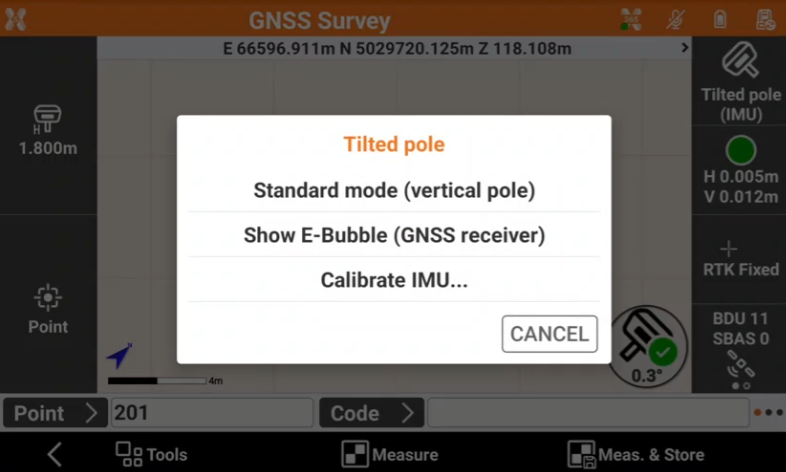
Tilt verification procedure (old GNSS firmware)
-
Zenith60, Zenith60 Pro: Firmware < 0.24.251210
-
Zenith55: Firmware < 0.24.251102
-
Follow the on-screen procedure:
-
Place the GNSS pole vertical on a point and press Start.
-
Swing the pole for 15 seconds back and forth and again for 15 seconds left and right.
-
If the verification is successful the user is informed with a Success message.
-
The procedure is not used to initialize the IMU.
-
Below video shows the procedure to perform a tilt verification procedure.
Tilt verification procedure (new GNSS firmware)
-
Zenith60, Zenith60 Pro: Firmware > 0.24.251210
-
Zenith55: Firmware > 0.24.251102
-
Follow the on-screen procedure:
-
Place the GNSS pole vertical on a point and press Start.
-
Swing the pole for 8 seconds back and forth.
-
Level the pole using the pole bubble for 8 seconds.
-
Rotate 90° with the GNSS receiver without moving the pole tip.
-
Repeat the same process following the on-screen procedure.
-
If the verification is successful the user is informed with a Success message.
-
The procedure is not used to initialize the IMU.
-
Below video shows the procedure to perform a tilt verification procedure from firmware 0.24.251102.