



-
The Measure mode allows to edit the type of measurements.
-
To open the Measure mode page click on the corresponding icon.
-
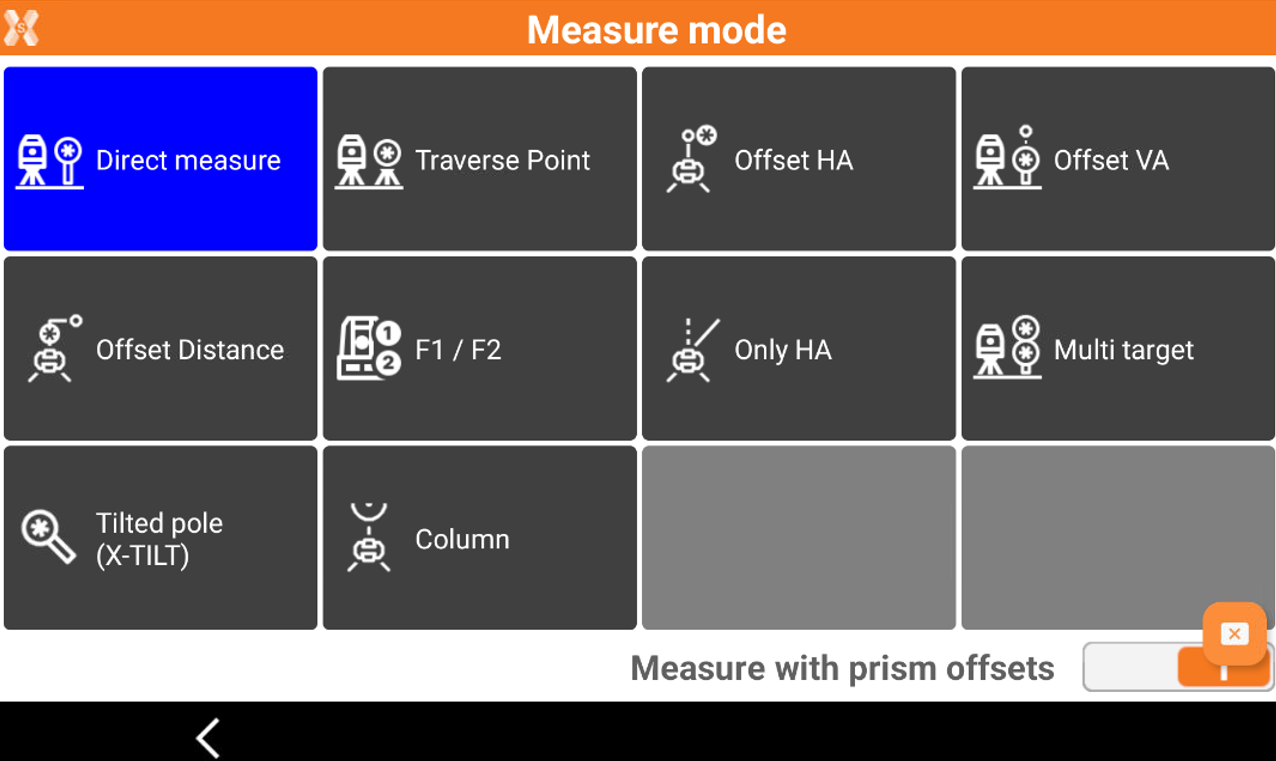
This open the Measure mode page.
-
Direct measure: measure directly to a point.
-
Traverse Point: specifies that the next point measured is a polygonal point. The polygonal points are saved to allow a rapid change of station.
-
Offset HA: performs a measurement to an object for which the prism cannot be placed at the point to measure.
-
Offset VA: performs a measurement to a point not accessible directly by the prism but above or below.
-
Offset Distance: performs a measurement to a point not accessible directly by the prism but at a certain distance along the direction between station and prism.
-
Face1/Face2: performs a measurement to a point in both faces and calculates the average.
-
Only HA: performs only an angle measurement to a point.
-
Multi target: performs a measurement using a multi target pole.
-
Tilted pole (X-TILT): performs a measurement to a point with two tilted pole measurements.
-
Column: measures a cylinder object measuring the sides and the center of the object.
-
Measure with prism offsets: performs a measurement to points applying an offset to prism measurements. The offset can be left, right or longitudinal.
-