



-
The software allows to define an area where search for the prism.
-
Open Robotic TPS page.
-
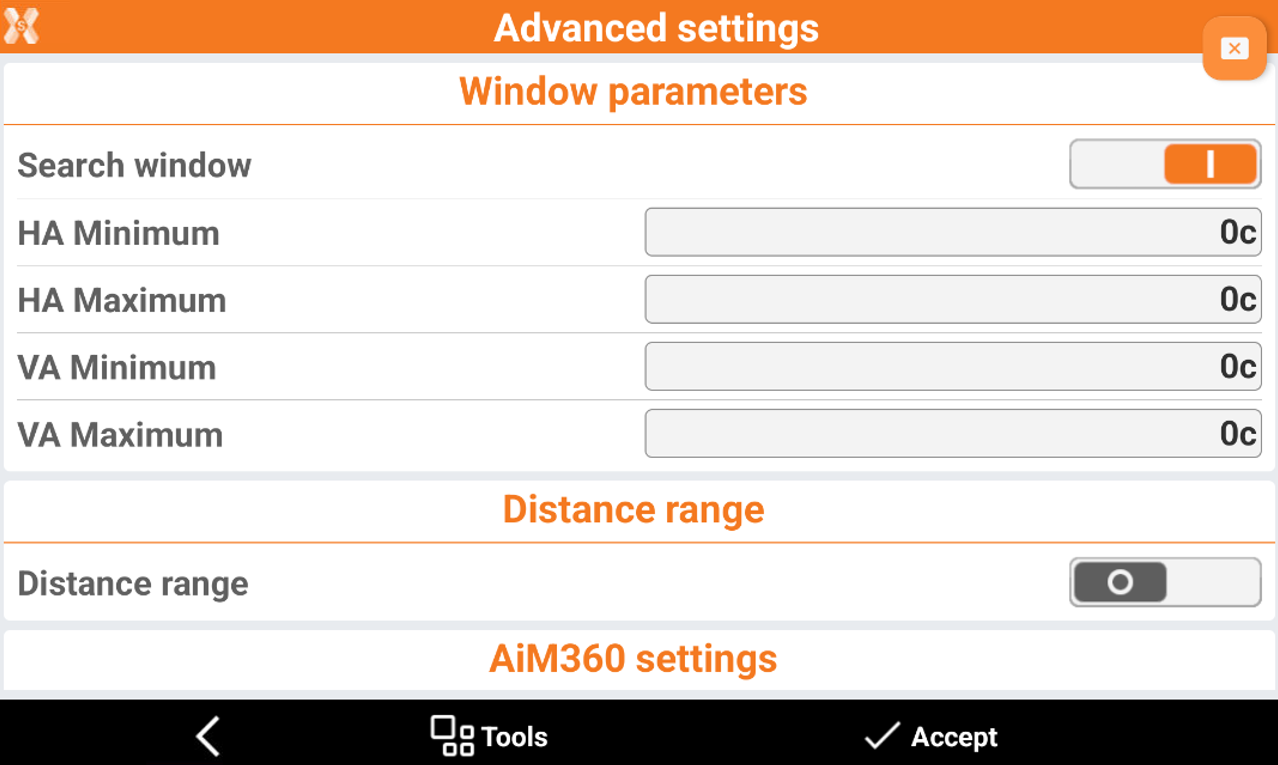
Click Settings to open the Advanced settings page.
-
It is possible to define the search window manually or using the instrument
Search window manual definition
-
It is possible to define the search window manually entering the angles.
-
Search window: activates to allow the prism search only inside the defined window.
-
HA Minimum: horizontal angle defining the left limit of the search zone .
-
HA Maximum: horizontal angle defining the right limit of search zone.
-
VA Minimum: vertical angle defining the lower limit of search zone.
-
VA Maximum: vertical angle defining the upper limit of search zone.
-
-
Define the distance limits:
-
Distance range: activate to limit the search inside distance limits.
-
Dist. Minimum: minimum distance of the search.
-
Dist. Maximum: maximum distance of the search.
-
Search window definition with instrument
-
Click Tools to open the window search tools:
-
Define window: aim to the lower left of the search window and then to the upper right. Then the search window angles are automatically defined.
-
Show window: check the defined search window.
-
New center: specify a new center for the search window.
-