



-
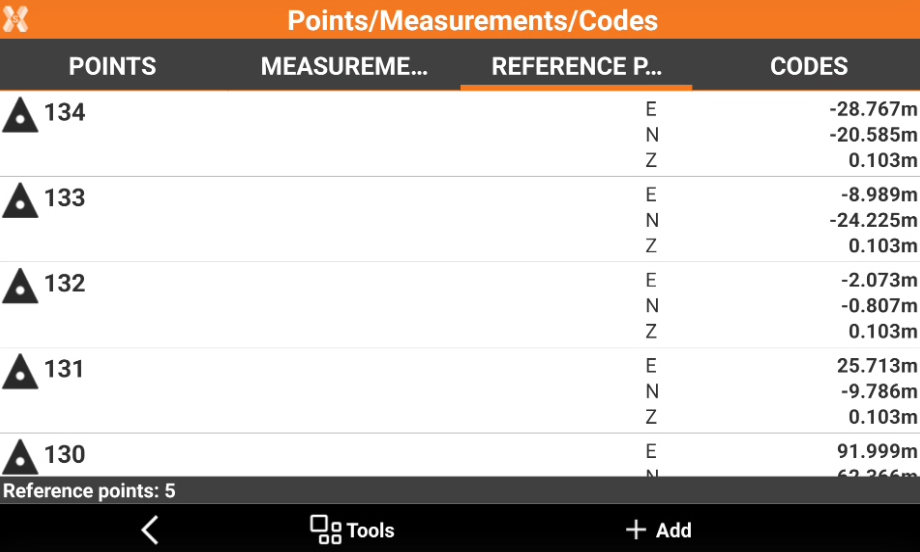
The table of reference points manages all topographic points with known coordinates which can be used in different situations as reference points and check points.
-
To open the Reference points page open the Job tab.
-
Select Points/Measurements/Codes.
-
Open the Reference points tab.
-
Create a reference point: how to create a new reference point in the reference point list.
-
Import reference points from an external file: how to import a list of reference points from an external file.
-
The reference job: how to use another job as reference job.
-
Edit a reference point: edit the point attributes.
-
Delete a reference point: delete a point from the reference point list.
-
Visualize a reference point in CAD: how to visualize a point location in the software CAD.
-
Stakeout a point from points list: how to stakeout a point from the point list.
-
Share a reference point: share to other applications the point information.
-
Rotate to reference point: rotate automatically a motorized total station to reference point direction.
-
Measure reference point elevation: how to update the elevation for a reference point.
-
Move reference points to point list: how to transfer points from the reference point list to the topographic point list.
-
Change reference points visualization: how to change the visualization of the points.
-
Search reference point: how to search for a point.
-
Invert coordinates: how to invert the coordinates of points.
-
Import and export points to different jobs: how to import and export points from other jobs.